

An agent opens the VICIdial login page, enters what looks like the right details, and gets this message: "Sorry, your phone login and password are not active in this system, please try again:". It is easy to assume the softphone or Asterisk is at fault. Usually, neither is involved yet.
In the VICIdial code we reviewed, this message comes from a database lookup on the web server. It runs before the agent session is set up and does not ask Asterisk anything. So the first checks belong in the phone record, not in the SIP configuration.
This guide is for VICIdial administrators and technical managers. It explains what the check tests, how it differs from SIP registration, and how to find the cause using read-only steps first. New to the platform? Start with What Is VICIdial? How It Works.
What the error actually checks
We read the login logic in vicidial.php from two public copies of the VICIdial code: version 2.14-690c (June 2023) and 2.14-727c (July 2026). The error appears when this query finds no matching row. Both copies use the same check:
SELECT count(*) FROM phones, servers
WHERE login = '<phone login>' AND pass = '<phone password>'
  AND phones.active = 'Y'
  AND phones.server_ip = servers.server_ip
  AND active_agent_login_server = 'Y';
In plain terms, the login only passes when one phone record meets all of these conditions:
- The login typed by the agent, after filtering, matches the phone's Agent Screen Login.
- The password, after filtering, matches the phone's Login Password.
- The phone's Active Account setting is Y.
- The phone's Server IP matches a server record.
- That server has Active Agent Server set to Y.
Before this check runs, VICIdial also looks for a phone alias with that name and, if it finds one, swaps in the alias's list of logins. Nothing in this path tests whether the phone is registered. A phone can be offline and still pass this check, and a phone can be registered and still fail it.
Installations can differ, especially patched or customised ones. You can confirm the logic on your own server in the troubleshooting steps below.
Phone login vs SIP registration
These are two separate checks with two separate passwords. Mixing them up is one reason this error takes so long to solve.
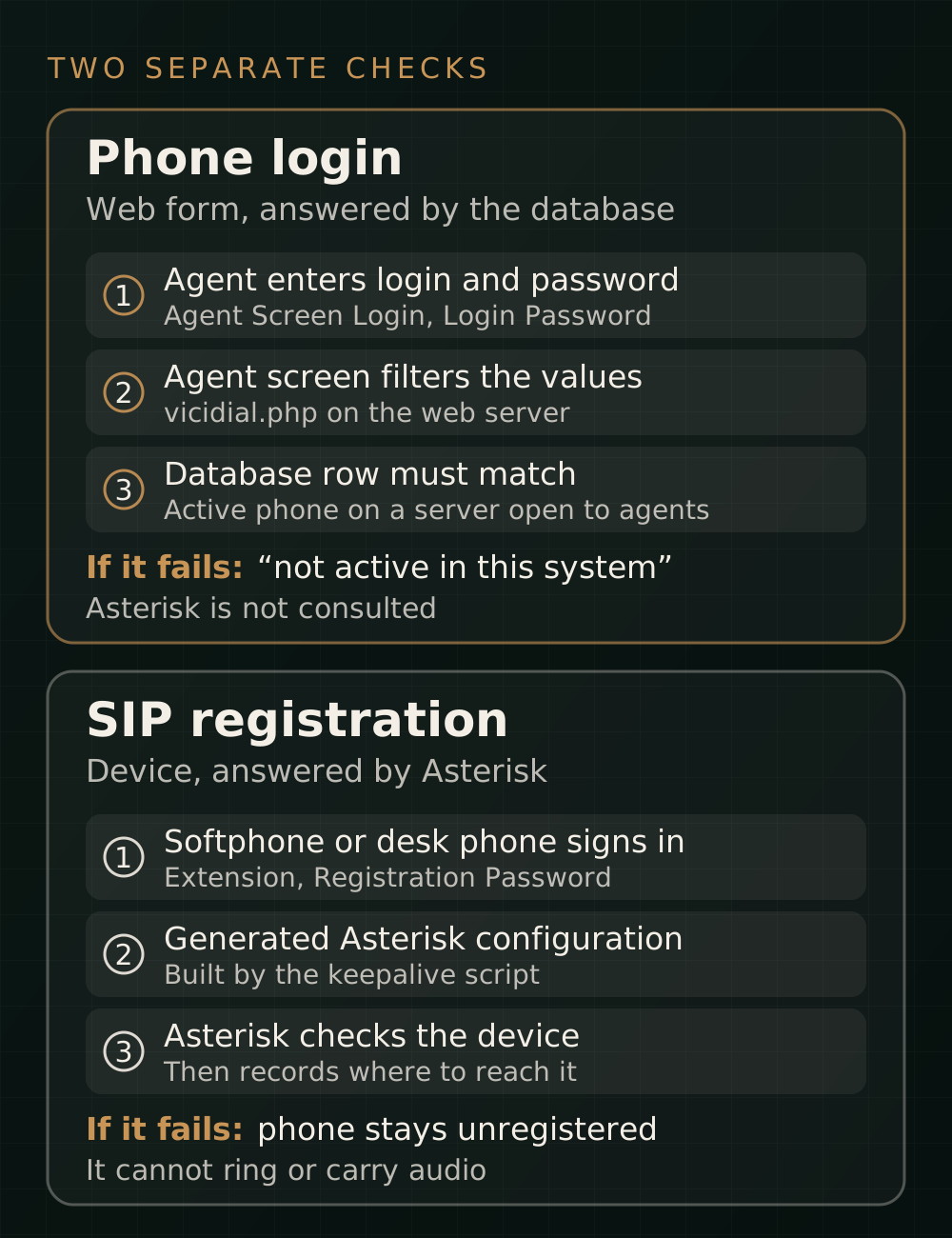
- Agent Screen Login and Login Password: used by the agent's browser on the phone login step. VICIdial's help text says the Login Password is only for this web login. These are the values this error is about.
- Extension and Registration Password: used by the softphone or desk phone to register with Asterisk. VICIdial writes them into the generated Asterisk configuration. Changing the Registration Password does not change the web login.
- User login and password: the agent's own account, found under Users rather than Phones. A wrong value here gives a different message, usually "Login incorrect, please try again".
A quick way to tell them apart: if the agent cannot get past the phone login step, start with the phone record. If the agent gets in but the phone does not ring or there is no audio, look at registration.
Likely causes, most common first
1. The wrong credentials in the phone fields
Advice on the official VICIdial forum consistently points here first. Common mix-ups are entering the agent's user login in the phone field, using the extension when the Agent Screen Login is different, or using the Registration Password instead of the Login Password.
Bulk-created phones are a special case. The Bulk Phone Insert tool adds a letter per server to the login, so extension 2000 can have the logins 2000a, 2000b and 2000c on a three-server cluster. Typing 2000 fails unless an alias with that name exists.
2. The phone is not active
The Active Account setting must be Y. It is easy to miss on phones that were disabled when someone left, copied from an old entry, or changed in bulk. An inactive phone gives the same message as a wrong password.
3. Characters the login form removes
This cause is easy to overlook, because the admin page and the agent screen do not filter values in exactly the same way. In the builds we read, with non-Latin mode off:
- The agent screen keeps only letters, numbers and commas in the phone login. The admin page also accepts dashes and underscores, so a login saved as
agent_101is submitted asagent101and cannot match. - The agent screen keeps letters, numbers, dashes and underscores in the phone password. The admin page's filter for the same field also allows dots, so a password containing a dot can be saved but not matched.
- Other symbols, such as @, # and %, are removed by both pages in these builds, so the saved value may be shorter than the one you typed. Open the phone record and read what was actually saved.
Filters have changed over time. A customised 2011-era copy we checked kept only letters and numbers in the phone password, so older systems can be stricter. For new phones, letters and numbers alone avoid the problem on any version.
4. Old values filled in from somewhere else
If the phone fields arrive empty, VICIdial can fill them from the Phone Login and Phone Pass saved on the user's account. Those values may be out of date if the phone record has changed since. Saved browser passwords, bookmarks and links that carry pl and pp values can also send old details without the agent noticing.
5. The server link is broken or closed to agents
The phone must point at a server record that exists, and that server must accept agent logins. Check this if the error began after a server move, IP change or database restore, or if it affects every phone on one server. On a cluster, also confirm that phones sit on the telephony servers you intend, not on a server with Active Agent Server set to N.
VICIdial includes ADMIN_update_server_ip.pl for server IP changes, and it updates the phone records too. Do not run it as a test. It changes data, so use it only for a planned IP change, with a backup.
6. A phone alias that does not match
With load-balanced logins, agents enter an alias and VICIdial expands it to the Phones Logins List. At least one listed phone must pass all the checks using the password the agent entered. A renamed phone, a typo in the list or a different password across phones can break this.
Safe troubleshooting steps (read-only first)
Test with one affected phone and change one thing at a time. Note the original values before you edit anything. None of the commands below change data.
- Confirm the exact wording of the error, and whether it affects one agent, one server or everyone. One agent points to that phone or user record. Everyone on a server points to the server settings.
- Open Admin > Phones and find the phone. Read the Agent Screen Login, Login Password, Active Account and Server IP. Type the values by hand in a private browser window to rule out autofill.
- If the agent leaves the phone fields blank or relies on a saved login, compare the Phone Login and Phone Pass on the user's account with the phone record.
- Open Admin > Servers and confirm that the phone's server has Active Agent Server set to Y.
- Check the login and password for any character the form may remove.
- If it still fails, run the database check below.
This query uses a LEFT JOIN, so it still shows the phone when no server matches. Run it with a read-only database account. Your database name and details are in /etc/astguiclient.conf, and many installations use asterisk. It does not select the password, so the result is safer to share.
SELECT p.login, p.extension, p.active, p.protocol, p.server_ip,
       s.server_ip AS matched_server, s.active_agent_login_server
FROM phones p
LEFT JOIN servers s ON p.server_ip = s.server_ip
WHERE p.login = '2000a';
Read the result like this:
- No rows: no phone has that login. Check for a bulk suffix, a typo or an alias.
activeis N: the phone is disabled. Confirm it should be in use, then change Active Account to Y.matched_serveris empty: the phone's Server IP matches no server record. Find out why before you edit it, especially after a migration.active_agent_login_serveris N: the server is closed to agent logins, possibly on purpose. Ask whoever manages the cluster before you change it.- Everything looks right: the remaining suspects are the password and filtered characters.
To see which values VICIdial actually compared, view the page source of the error page in your own browser. In both builds we read, an HTML comment beginning server query: shows the query with the filtered login and password. Those are real credentials, so do not paste that source into a ticket or forum.
To confirm the wording and filters in your own copy, search the agent screen file on the web server. The path varies. /srv/www/htdocs/agc is common on VICIbox-style installs:
grep -n "not active in this system" /srv/www/htdocs/agc/vicidial.php
grep -n "SELECT count(\*) from phones,servers" /srv/www/htdocs/agc/vicidial.php
grep -n 'phone_login=preg_replace\|phone_pass=preg_replace' /srv/www/htdocs/agc/vicidial.php
If login works but the phone does not
Once the agent is past the phone login, phone problems become Asterisk problems. Start by finding out which SIP stack the phone uses. Check the phone's Client Protocol in VICIdial and your Asterisk version, because the commands differ.
asterisk -rx "core show version"

# Phone protocol SIP (chan_sip)
asterisk -rx "sip show peer 2000"

# Phone protocol IAX2
asterisk -rx "iax2 show peer 2000"

# PJSIP phones
asterisk -rx "pjsip show endpoint 2000"
asterisk -rx "pjsip show contacts"- Peer or endpoint missing: the phone has not loaded into Asterisk. Confirm the phone is active and on this server, and that the server has Generate conf files set to Y. VICIdial's keepalive script normally runs every minute from cron and rebuilds the files when Rebuild conf files is Y.
- Files updated but Asterisk did not reload: the keepalive script sends reload commands to a screen session named
asterisk. If a normal system service started Asterisk instead, those commands may not reach it. Runscreen -lsto check, and see howstart_asterisk_boot.plis meant to start it on your install. - Peer present but unregistered: check the Registration Password on the device, the server address, the firewall and NAT. Asterisk's logs will usually say more than the phone does.
- PJSIP endpoint has no contact: follow the official PJSIP troubleshooting guide, which covers endpoints, AORs and failed registrations.
A manual reload can affect a live system, so schedule it and be sure why you need it. Don't restart Asterisk while calls are active.
Version notes
- VICIdial: login filters and field limits vary by build. Admin page labels can also vary, and the Registration Password was formerly called Conf File Secret. Check your own version rather than relying on an old forum post.
- chan_sip: Asterisk deprecated it in version 17 and removed it in version 21, so
sip showcommands are not available on a standard 21 or later install. - PJSIP in VICIdial: VICIdial's own document says full support arrived in svn/trunk revision 3511. Its example covers Asterisk 18 on VICIbox 12, using the Allowed SIP Stacks system setting, and existing phones must be changed by hand. Test before you switch a live system.
- Asterisk support: check the official Asterisk versions table before planning a change. Confirm that your VICIdial build supports a version before you upgrade to it.
What to avoid
- Don't edit the
phonesorserverstables directly. Make changes in the admin pages, where you can see what you are changing. - Don't reinstall or restart Asterisk to fix this message. The check does not depend on it.
- Don't edit
vicidial.phpto loosen the filters. They are there for security, and an update can overwrite your change. - Don't reuse one weak password across all phones to get agents working. Weak Registration Passwords are a particular risk if SIP is reachable from the internet.
- Don't test repeatedly with an agent's user password. VICIdial's documentation describes a 15-minute account lock after 10 failed login attempts.
- Don't post screenshots, page source or configuration files containing real passwords when you ask for help.
FAQ
Is this error caused by SIP registration?
Not in the code we reviewed. The message comes from a database check of the phone and server records, and that check does not ask Asterisk whether the phone is registered. Fixing registration can still be necessary, but it is a separate job.
Do I need to wait after creating a phone?
For this check, the phone record only has to exist in the database with the right values. Registration is different: Asterisk needs the rebuilt configuration, which normally happens through the keepalive script. If a new phone cannot register, give that a few minutes and then check.
Are the Login Password and Registration Password the same?
They are separate fields. The Login Password is for the web phone login, and the Registration Password is for the device connecting to Asterisk. Keep the Registration Password strong whatever you choose for the other.
Why does it fail when the phone shows Active?
Active is only one condition. The login and password must also match after filtering, and the phone's server must exist and accept agents. The SQL check above shows most of these at once.
Why does only one server's phones fail?
Check that server's Active Agent Server setting first. Then confirm its server record still has the IP address the phones point to, especially after a move or restore.
Does a webphone change any of this?
The phone login check is the same in the code we read. A webphone adds its own browser and registration requirements after login, so treat those as a separate step.
Sources and further reading
Checked in November 2026. We read the code through public copies of the VICIdial source because the official SVN server could not be read from our test environment. One of these copies states that it includes some modifications, so verify against your own installation. We have not reproduced this error on a live VICIdial server for this article.
- VICIdial documentation index on vicidial.org, including the PJSIP support and encrypted passwords documents
- Asterisk 21 module removal: chan_sip from the Asterisk project
- Migrating from chan_sip to res_pjsip in the Asterisk documentation
- Asterisk PJSIP troubleshooting guide in the Asterisk documentation
- VICIdial source copy, version 2.14-727c and version 2.14-690c on GitHub: community copies, not official releases
- VICIdial forum thread on bulk phones and this error: shows suffixed agent logins in a cluster
- Striker24x7 article on this error: an independent community guide that also covers Asterisk-side checks
- What Do You Need to Set Up VICIdial?: our planning checklist for a first installation
If you need hands-on help, see our Asterisk troubleshooting and VoIP and VICIdial services.