


If you run a sales team, a support desk, or an appointment-setting operation, someone has probably mentioned VICIdial to you. It comes up often because it is a capable call-centre system that you can use without paying per-seat software licences. But most explanations jump straight into servers, Asterisk, and SIP trunks, which is not much help if you just want to know what it does and whether it fits your business.
This guide starts simple and builds up gradually. Every technical term is explained the first time it appears. It is not an installation tutorial. The goal is to help you understand how VICIdial works well enough to make a sensible decision and ask the right questions.
What is VICIdial? The simple explanation
VICIdial is open-source contact-centre software. Open source means the source code is publicly available and you can use it without buying a software licence. It is maintained by the VICIdial Group, which also sells hosting, hardware, and support for people who want help running it.
In everyday terms, VICIdial is the system that sits between your team and the phone network. It holds your lists of people to call, decides who gets called next and when, places the calls, connects answered calls to available agents, and records what happened on each call. It can also receive incoming calls and route them to the right people.
Your agents (the people making and taking calls) use VICIdial through a web browser. Managers also use a web-based admin screen to set up campaigns, watch activity in real time, and run reports. Underneath, VICIdial relies on another open-source program called Asterisk to handle the actual phone calls. We will explain that relationship shortly.
According to the official project pages, VICIdial supports outbound, inbound, and blended calling, where one agent handles both incoming and outgoing calls in the same session. It also includes call recording, scheduled callbacks, call transfers, scripts for agents, real-time and summary reports, and support for agents working remotely.
A realistic business example
Imagine a home-solar installation company. It is a hypothetical business used here only to illustrate the flow. People visit its website, fill in a form asking for a quote, and tick a box agreeing to be contacted by phone about their enquiry. Each week the company collects a few hundred of these requests.
Without a dialer, the sales team works from a spreadsheet. Each person copies a number, dials it on a desk phone, writes notes in a separate column, and tries to remember who asked to be called back on Thursday. Some leads get called three times in one day while others are never called at all. The manager cannot easily see who is busy, how many people were reached, or why.
With VICIdial, the company imports the enquiry list into a campaign. Agents log in through their browser. VICIdial presents or dials the next contact, shows the person's details and a short call script on screen, and connects the call. After each call, the agent picks a result such as Quote booked, Not interested, Call back later, or Do not call. Callbacks are scheduled automatically, people who asked not to be called are excluded from future attempts, and the manager can see live activity and daily reports.
Notice what made this example acceptable: the company is calling people who asked to be contacted, about the thing they asked about. VICIdial is a tool for organising calls you are allowed to make. It does not make cold calling or bought contact lists legal, and the compliance section below explains why that matters.
How outbound calls work, step by step
Outbound means your business is calling customers. Here is the journey of a single outbound call through a typical VICIdial setup, in the order it happens.
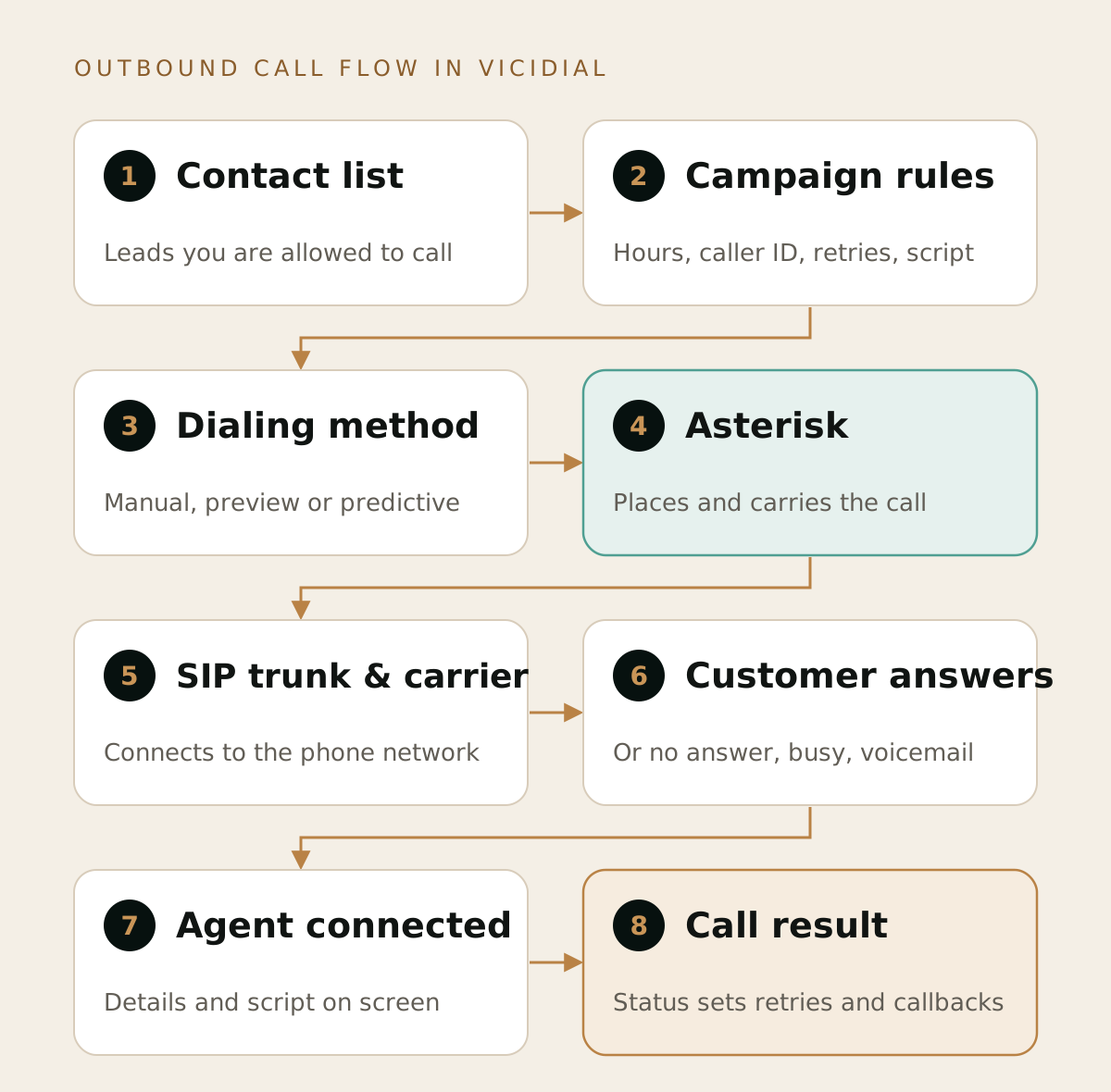
Interactive walkthrough
Follow one outbound call, stage by stage
Press Play, or use the arrow buttons or your keyboard's left and right arrow keys, to highlight each of the eight stages in the diagram above.
1. The contact list
Everything starts with a list. VICIdial calls each record a lead, which simply means one contact you intend to call. A lead usually has a phone number, name, and any extra details you want agents to see. Lists can be uploaded through the admin screens or sent in automatically from another system using VICIdial's lead import API. An API is a way for two pieces of software to exchange data without a person copying it across.
2. The campaign
A campaign is a set of rules for calling one or more lists. It controls which lists are active, which agents can work on it, which caller ID number is shown to the person being called, what script agents see, the allowed calling hours, how many times to retry unanswered numbers, and which dialing method to use. One VICIdial system can run many campaigns at the same time, for example one for new enquiries and another for appointment reminders.
3. The dialing method
The campaign's dialing method decides when a call is placed and how many calls are placed at once. It might wait for an agent to click a button, or it might dial automatically as agents become free. The next section covers this in more detail. Before dialing, VICIdial also applies the campaign's filters, such as skipping numbers on a do-not-call list and only calling within the permitted hours for the lead's time zone.
4. Asterisk places the call
VICIdial does not create phone calls by itself. It tells Asterisk, the telephony engine running on the server, to call a particular number. Asterisk handles the technical work of setting up the call, carrying the audio, playing hold music, and recording.
5. The calling provider, or SIP trunk
To reach ordinary phones, Asterisk passes the call to a telecom carrier, the company that connects you to the public phone network. Most modern setups connect to carriers over the internet using SIP, the standard signalling protocol for internet phone calls. The connection to that provider is called a SIP trunk. Think of it as a virtual phone line, or a bundle of lines, delivered over the internet. Carriers typically charge for calling minutes and for phone numbers. VICIdial can also work with traditional telephone lines through special hardware, but SIP trunks are the most common choice today.
6. The customer answers
The carrier rings the customer's mobile or landline. If nobody answers, the line is busy, or the number is invalid, VICIdial records that outcome and can retry later according to the campaign rules. Some campaigns use answering machine detection, often shortened to AMD, which tries to tell whether a person or a voicemail system picked up. It is useful but not perfect, so it can occasionally misjudge a real person.
7. The agent is connected
When a real person answers, VICIdial connects them to an available agent. At the same moment, the agent's screen shows that customer's details and the script. Agents hear and speak through a headset connected to a softphone (a phone application on their computer), a desk phone, or another phone the system is set up to use.
8. The call result
When the conversation ends, the agent selects a disposition. A disposition, which VICIdial also calls a status, is a short label describing the outcome, such as Sale, Callback, Not interested, Wrong number, or Do not call. Campaigns can have their own custom dispositions. This step is what makes reporting and follow-up work: VICIdial uses statuses to decide whether to call a lead again, when to schedule a callback, and what to show in reports. The call itself, its timing, and optionally its recording are logged.
Put together, the chain looks like this: contact list, then campaign rules, then dialing method, then Asterisk, then SIP trunk and carrier, then the customer's phone, then the agent, and finally the recorded result.
What is the difference between VICIdial and Asterisk?
This is one of the most common points of confusion, so it is worth being precise.
Asterisk is an open-source telephony platform. It can act as a PBX, which is a private business phone system that handles extensions, transfers, voicemail, and phone menus. Asterisk knows how to make, receive, connect, and record calls, but it has no built-in idea of a sales campaign, a lead list, or an agent's performance.
VICIdial is a contact-centre application built on top of Asterisk. It adds the business layer: lists, campaigns, dialing logic, agent screens, scripts, dispositions, callbacks, queues, reporting, and user permissions. It keeps this information in a database and uses Asterisk as the engine that carries the calls.
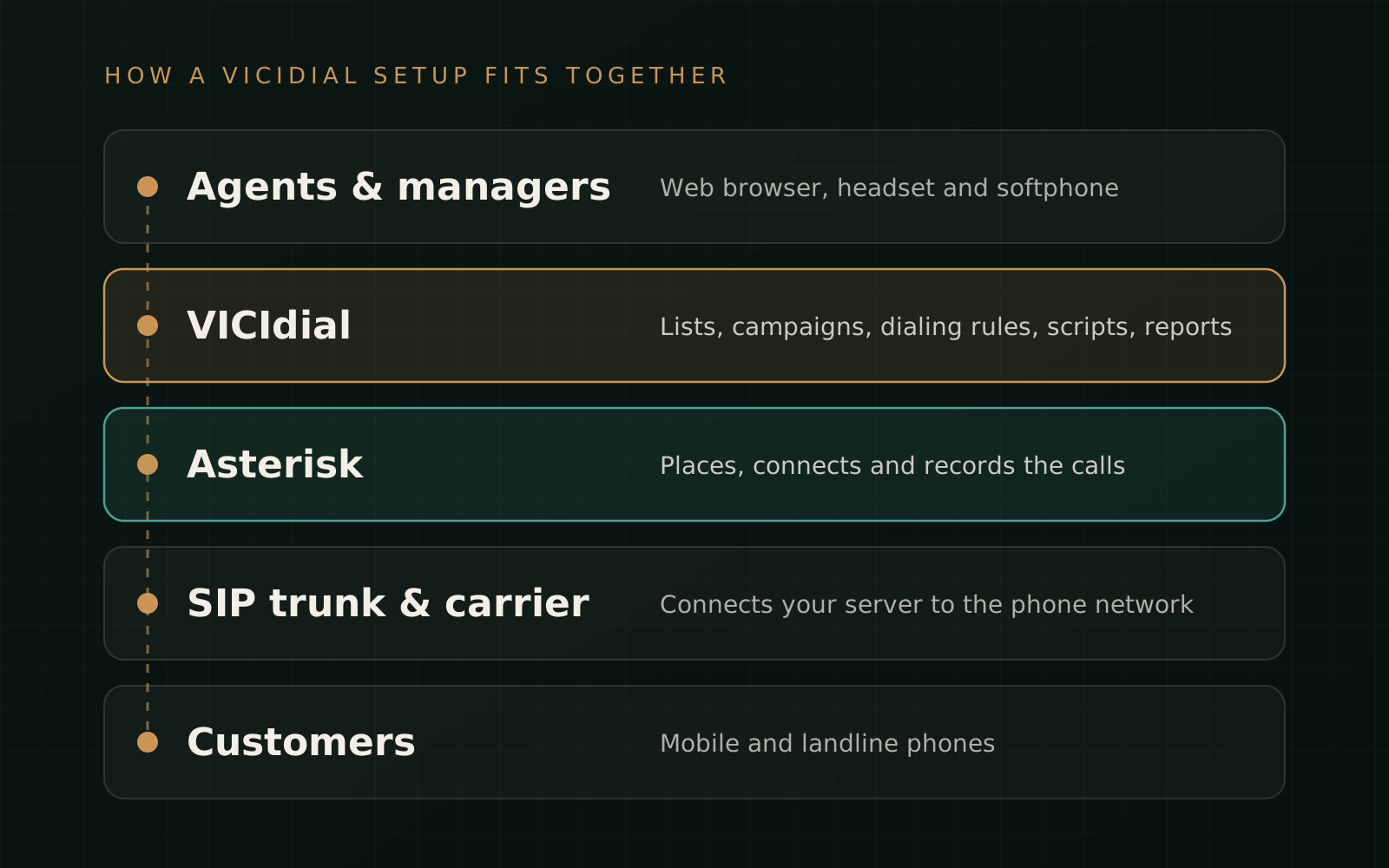
A helpful comparison is a car. Asterisk is the engine. VICIdial is the rest of the vehicle: the dashboard, steering, seats, and navigation that make the engine useful for a particular job. You can use Asterisk without VICIdial, for example as an office phone system, but you cannot run VICIdial without Asterisk. If your business needs a custom phone system rather than a call centre, that is Asterisk work, which we cover in our Asterisk development services.
Manual, preview and predictive dialing explained
The dialing method has the biggest effect on how a campaign feels to agents and to the people being called. VICIdial supports several modes. These are the three most beginners need to understand.
Manual dialing
The agent decides when each call is placed. VICIdial can give the agent the next lead from the list, and the agent clicks to dial it. The agent waits through the ringing and any unanswered calls. This is the slowest mode, but it gives agents the most control and the lowest risk of a customer answering with nobody on the line. It suits small teams, high-value conversations, and situations where rules restrict automated dialing.
Preview dialing
Preview dialing is a form of manual dialing where the agent sees the lead's details before the call is placed. They might read previous notes, check what the customer enquired about, or decide to skip the lead. In VICIdial this is an option within manual dialing. It works well when every conversation needs context, such as follow-ups on detailed quote requests or account management.
Predictive dialing
In predictive mode, VICIdial dials automatically and may place more calls than there are free agents. It does this because many calls are not answered. The system watches answer rates and how long agents take on calls, then adjusts how many numbers to dial so that, ideally, an agent becomes free just as a customer answers. The official features list describes this as an adaptive dialing algorithm.
The benefit is less waiting time for agents. The trade-off is that sometimes a person answers and no agent is free. That call is then dropped or abandoned, and the person may hear silence or a recorded message. Abandoned calls frustrate people and are regulated in several countries. VICIdial includes controls for this, such as a target maximum drop percentage, a drop timer, and a safe-harbor message, which is a short recorded message played when no agent is available. These settings help you operate within limits, but you still need to configure them correctly and check the rules that apply to you.
Between manual and predictive, VICIdial also supports simpler automatic modes, where the system dials a fixed number of lines per available agent, and broadcast dialing, which plays a pre-recorded message. Broadcast and pre-recorded calls are often subject to strict consent rules, so treat them with particular care.
A practical rule of thumb for beginners is to start with manual or preview dialing. Move to automatic or predictive dialing only once you understand your list quality, answer rates, agent numbers, and legal obligations.
How inbound calls work
Inbound means customers are calling you. VICIdial can act as an ACD, or automatic call distributor, which is the system that decides which agent should receive each incoming call.
Phone numbers (DIDs)
It starts with a phone number your customers dial. In telecom terms this is often called a DID, short for direct inward dialing number. You usually rent these from your SIP provider, or port your existing numbers to them if the provider supports it. When someone calls the number, the carrier sends the call over the SIP trunk to your server.
IVR menus
An IVR, or interactive voice response, is a phone menu: press 1 for sales, press 2 for support. VICIdial includes web-configurable IVRs, so a caller can be directed to the right team before reaching a person. A simple setup might skip the IVR entirely and send all calls to one team.
Queues, or in-groups
VICIdial calls an inbound queue an in-group. If no suitable agent is free, the caller waits in the in-group, usually hearing music on hold. The official features list includes estimated hold time and place-in-line announcements, overflow to other queues, queue priority, and an option for callers to keep their place in line and receive a callback instead of waiting.
Agents
Agents choose, or are assigned, which in-groups they take calls from. When an agent becomes free, VICIdial sends them the next call based on the routing rules. These can include skills-based ranking, which means preferring agents who are better suited to that queue. The caller's details appear on the agent's screen, and the agent records a disposition at the end, just as with outbound calls. Agents can also take both inbound and outbound calls in a single blended session, so they make outbound calls when the inbound queue is quiet.
What infrastructure does a business need?
VICIdial is software, so you need somewhere to run it and a way to connect it to the phone network. A typical setup includes the following.
- A server. This is the computer that runs VICIdial and Asterisk. It can be a cloud server, a dedicated server in a data centre, or hardware in your office. Larger operations spread the work across several servers, and the official documentation describes load balancing across multiple Asterisk servers.
- The supporting software. Per the official requirements, VICIdial runs alongside Asterisk, a MySQL or MariaDB database, the Apache web server, PHP, and Perl, usually on Linux. VICIbox, the official installer image, bundles these together to simplify installation.
- A SIP trunk and phone numbers from a carrier that permits your type of calling in the countries you will call.
- Agent equipment: a computer with a modern web browser, a decent headset, and a softphone or desk phone. The official pages state that agents can log in from anywhere with a phone, a web browser, and an internet connection.
- Reliable internet with good quality for voice, both at the server and at each agent's location. Voice is sensitive to unstable connections, and poor networks cause choppy or delayed audio.
- Someone responsible for administration: setting up campaigns and users, applying updates, monitoring the system, backing up data, and handling problems.
- Storage for call recordings if you record calls, plus a policy for how long you keep them.
If you prefer not to manage servers yourself, you can use a hosted VICIdial service, either from the VICIdial Group or from a third-party provider, or work with a technical partner who sets up and maintains the system for you.
Is VICIdial free?
The software is free to use. The official project site states that VICIdial is open source under the AGPLv2 licence, with no software licensing cost. However, a working call centre has other costs. It helps to separate them clearly.
- Software licence: none for VICIdial itself.
- Servers or hosting: a monthly cloud or dedicated server bill, or the cost of your own hardware. Bigger teams and heavy call recording need more capacity.
- Calling costs: SIP trunk usage, usually per minute or per channel, plus monthly rental for phone numbers. This is often the largest ongoing cost for outbound campaigns.
- Setup and configuration: installation, security hardening, carrier connection, campaigns, IVRs, scripts, and testing. This takes skilled time, whether it is your staff or an outside provider.
- Ongoing maintenance and support: updates, monitoring, backups, troubleshooting, and changes as your campaigns evolve. You can also buy support contracts.
- Compliance tools and processes: for example, checking lists against national do-not-call registers, which may involve fees, and managing consent records.
- Agent equipment and connectivity: headsets, computers, and internet.
So the honest answer is that VICIdial removes software licence fees, not running costs. For many teams that saving is significant, especially as seat counts grow. Still, compare total monthly cost, including your own team's time, against a hosted alternative before deciding.
Benefits and limitations
Benefits
- No per-seat software licence fees, which matters as teams grow.
- A broad feature set covering outbound, inbound, blended, recording, callbacks, transfers, scripts, IVRs, reporting, and manager monitoring.
- Control over your own system and data when you host it yourself.
- Flexibility to choose your carrier and change it later.
- APIs for connecting VICIdial to other systems, such as importing leads from your website or opening a CRM record during a call.
- Support for remote agents, who need only a browser, a phone or softphone, and an internet connection.
Limitations
- Learning curve. There are many settings, and the admin screens are dense. Misconfigured campaigns are a common source of problems.
- Maintenance is your responsibility when self-hosting. Someone needs Linux, database, and Asterisk knowledge to keep it updated, backed up, and healthy.
- Security needs ongoing attention. Phone systems connected to the internet are frequent targets for toll fraud, where attackers break in and make expensive calls at your expense. Firewalls, strong passwords, limited admin access, prompt updates, and spending or destination limits with your carrier all matter.
- Call quality depends on more than software. Your carrier, server location, and network quality at each agent's desk all affect what customers hear.
- Compliance is not automatic. VICIdial provides tools such as DNC lists and calling-hour restrictions, but you must configure them correctly and decide what the law requires for your calls.
Legal and compliance considerations
Calling rules vary widely by country, and sometimes by state or province. They change over time too. This section is general information, not legal advice. Please confirm your obligations with a qualified adviser in the places where you operate and where the people you call are located. The main areas to check are these.
- Consent. Many places require some form of permission before you call people for marketing, and the requirements are often stricter for automated or pre-recorded calls and for calls to mobile phones. Keep records of when and how consent was given.
- Do-not-call rules. Several countries run national do-not-call registers, such as the National Do Not Call Registry in the US, the Telephone Preference Service in the UK, the Do Not Call Register in Australia, the National DNCL in Canada, and the DND registry overseen by TRAI in India. You also need to honour individual requests not to be called again. VICIdial supports system-wide and per-campaign DNC lists, but you must keep them up to date.
- Calling hours and local restrictions. Rules often limit the times of day you may call, and some require specific caller ID behaviour, such as showing a valid number people can call back. VICIdial can restrict dialing by time zone and day of week, so configure it to match the rules that apply to your calls.
- Abandoned and silent calls. Where predictive dialing is used, regulators in several countries limit how many answered calls may be dropped and expect a short message when no agent is available. Set drop rates and messages conservatively.
- Call recording. Laws differ on whether you must tell people a call is recorded, and whether everyone on the call must agree. Data protection laws may also govern how long you keep recordings, who can access them, and how they are secured. A clear announcement at the start of calls is a common practice.
- Data protection. Contact lists contain personal data. Store them securely, limit access, and only use them for the purpose people agreed to.
No software can guarantee compliance. VICIdial gives you controls, and your processes determine whether you use them correctly.
Beginner FAQ
Is VICIdial a CRM?
Not really. It stores lead details, custom fields, call history, and dispositions, which is enough for many calling teams. A CRM, or customer relationship management system, usually goes much further with deals, pipelines, email, and account history. Many businesses use both, with VICIdial handling calls and passing data to or from the CRM through its APIs or a custom web page opened during the call.
Can my agents work from home?
Yes. Remote agents are supported. Each agent needs a stable internet connection, a browser, a headset, and a softphone or phone. Security for remote access, such as restricting which locations can log in, deserves extra thought.
Do I need to know Linux to use VICIdial?
Agents and most managers do not. They work in the browser. Someone does need Linux and server skills to install, secure, and maintain the system, unless you use a hosted service or a technical partner.
Can I use VICIdial only for inbound calls?
Yes. Some businesses use it purely as an inbound system with IVRs, queues, and recordings. Others use only outbound, or a blend of both.
Can I keep my existing business phone numbers?
Often, yes. You can either port the numbers to a SIP provider that supports porting, or forward calls from your current provider. Whether porting is possible depends on the country, number type, and providers involved.
How many agents can VICIdial support?
The official project describes it as scalable to hundreds of seats, using multiple servers for larger deployments. The practical limit for your setup depends on server capacity, call volume, recording, and how the system is configured. Size it based on your expected peak load rather than averages.
What are VICIbox and VICIhost?
VICIbox is the official installer image that packages VICIdial with the operating system and supporting software. VICIhost is the VICIdial Group's hosted service, where they run the servers for you. Both are versions of the same VICIdial software, just delivered differently.
Does VICIdial record calls?
It can record all calls automatically or let agents start and stop recording, including stereo recordings with the agent and customer on separate channels. Check the recording-consent rules that apply to you, and plan storage and retention in advance.
Ideas for future learning
Once the basics are clear, these topics are worth exploring next. You do not need them on day one.
- List recycling and lead strategy: automatically retrying certain statuses, such as no answer, at set intervals, and managing alternate numbers for the same contact.
- Answering machine detection trade-offs: the balance between saving agent time and wrongly hanging up on real people.
- Integrations: using the lead import API and agent API to connect VICIdial with your website forms, CRM, or helpdesk.
- Reporting that matters: contact rates, average handle time, agent pause reasons, and outcome by list source.
- Scaling: splitting the database, web, and telephony work across multiple servers as you grow.
- Voice quality basics: codecs (how audio is compressed), latency, and jitter, and how they affect what customers hear.
- Security hardening: firewall design, restricting admin access, monitoring for unusual call patterns, and carrier-side fraud limits.
Sources and further reading
Feature and licensing details in this guide are based on the official VICIdial project and commercial sites. Feature availability can vary by version and configuration, so check the current documentation for your installation.
- VICIdial features list on vicidial.com
- VICIdial project page on vicidial.org, including system requirements and licence
- VICIdial open-source software overview on vicidial.com
Where Triviio can help
Triviio provides technical help with VICIdial and Asterisk, including setup, carrier connection, campaign and IVR configuration, troubleshooting, and ongoing support. You can read more about our VoIP and VICIdial services, or see our pages on Asterisk troubleshooting and Asterisk support if you already have a system that needs attention.